Have you worked with Split Queries in EF Core before?
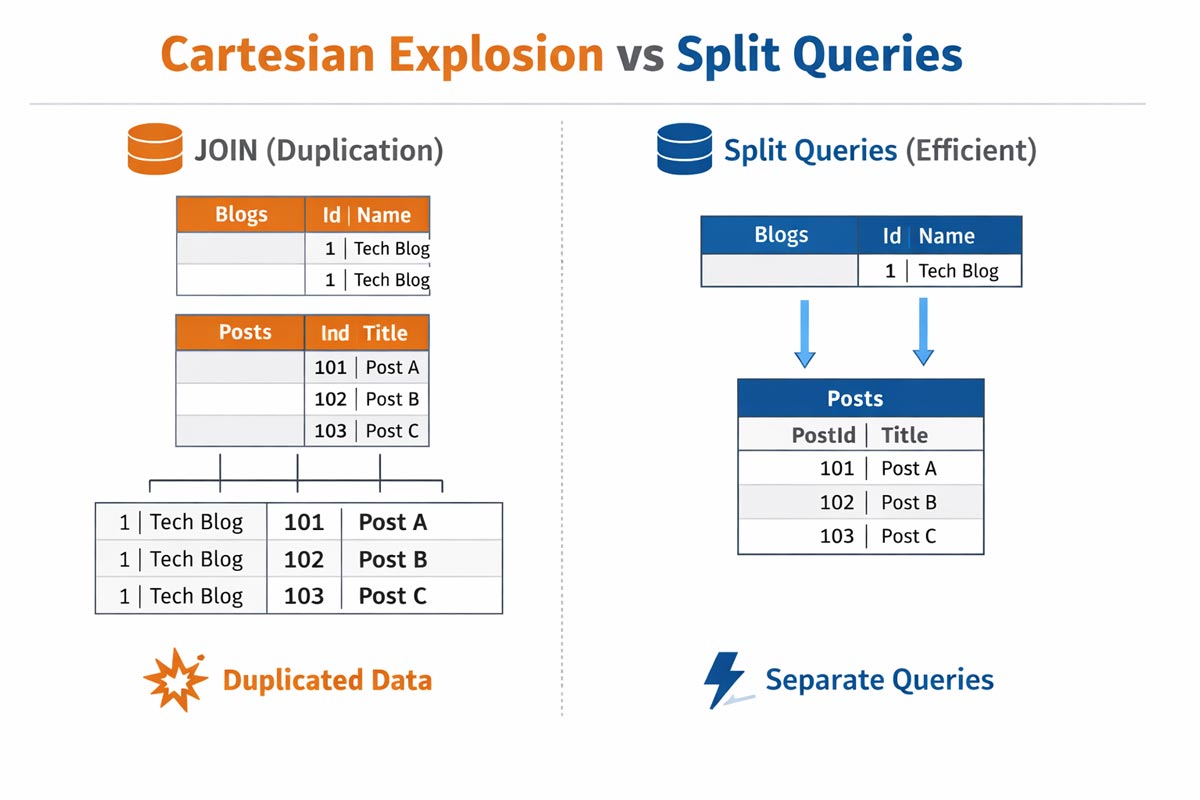
When you incorporate related tables using EF Core, it typically generates a JOIN query, potentially leading to duplicated data. While this duplication is usually insignificant for small datasets, it can become problematic when dealing with larger volumes.
When multiple collections are included, SQL JOINs multiply rows exponentially, not linearly.
| |
Imagine a scenario where you have a table with 1000 posts and each post has 1000 comments. If you use the query below, you will get 1000 * 1000 = 1,000,000 rows in the result. This phenomenon is known as Cartesian Explosion, causing unexpected spikes in data loads.
| |
The issue arises when the Posts table contains extensive columns like binary data or lengthy text fields. In such cases, the duplicated data is transmitted to the client multiple times, intensifying memory and network consumption.
To mitigate this, Split Queries come into play.
EF Core employs separate queries instead of a single JOIN, effectively curbing data redundancy.
Under the hood, EF Core executes one query per included collection and then performs the relationship fix-up in memory.
However, this approach does introduce certain trade-offs:
- Pros: Mitigates extensive duplicated data.
- Cons: Additional database round trips, more latency and, maybe, inconsistent data if the data changes between the queries.
Exercise Caution! While Split Queries can enhance performance under specific circumstances, they might elevate the number of database round trips. Therefore, it’s advisable to implement them judiciously.
When to use Split Queries
- When loading multiple collections (
Include) - When dealing with large payload columns (e.g. blobs, long text)
- When experiencing high memory usage or network overhead
When NOT to use
- Small datasets
- Low-latency environments where round trips are expensive
- When strong consistency across the result set is required
Split Queries are not a replacement for fixing N+1 problems - they solve a different class of performance issues.
👉 Adapted from my original post on LinkedIn .